Tag: instagram

  • Stop Spying, Start Learning: A Better Way to Use Meta Ad Library

    Stop Spying, Start Learning: A Better Way to Use Meta Ad Library

    Here’s what usually happens. A marketer opens Meta Ad Library, searches a competitor, finds an ad that looks polished, screenshots it, and tries to rebuild it with their own logo. Then they wonder why the results don’t match.

    The problem isn’t the tool. The problem is the approach. Competitor research was never supposed to be a shortcut to creative work. It’s meant to help you understand the market, not replace thinking about your audience.

    The goal of looking at competitor ads isn’t replication. It’s understanding. And those are very different things.

    Copying a competitor’s ad is like wearing someone else’s outfit to a first date. Sure, it might look good on them. But it’s not you, and your audience can tell.

    Delphi, Bluekona AI mascot

    What Is the Meta Ad Library

    Meta Ad Library is a free, publicly accessible database of ads running across Facebook, Instagram, Messenger, and Threads. No account needed. You can search any brand name or keyword and immediately see what ads are currently live.

    It was originally built for ad transparency, but it has quietly become one of the most useful market research tools available to anyone running paid or organic social media. You can view ad creatives, read the copy, see how long an ad has been running, and in some cases check regional targeting details.

    What you cannot see is performance data. No click-through rates. No conversion numbers. No engagement metrics. Just the ad itself, which means interpretation is entirely on you.

    What Competitor Ads Actually Reveal

    When you stop looking for ads to copy and start looking for patterns to learn from, the Meta Ad Library becomes genuinely useful. Here’s what’s actually in there if you look at it the right way.

    01
    Market Positioning
    How brands in your space describe themselves and what they want to be known for. The words they keep using tell you a lot about how the category talks about itself.
    02
    Customer Pain Points
    The problems brands keep returning to, because those are the ones their customers care about most. Repetition across multiple brands signals a real, shared frustration.
    03
    Common Offers
    What incentives dominate the category, from free trials to percentage discounts to lead magnets. Seeing the same offer everywhere tells you what the market expects.
    04
    Content Trends
    Whether the market is leaning into UGC, founder video, carousels, or static image ads right now. Format trends move fast and competitor research catches them early.
    05
    Seasonal Priorities
    What brands push at different times of year and where the gaps in the calendar tend to appear. Knowing the rhythm helps you plan ahead instead of reacting.
    💡
    Keep in mind
    Patterns beat individual ads every time
    None of this tells you what will work for your audience. But it tells you what the market conversation looks like right now, which is valuable context before you make any creative decisions.

    A Practical Meta Ad Library Research Process

    If you want to use the tool well, slow down and be systematic about it. A few searches and screenshots won’t teach you much. Pattern recognition takes a little more time.

    1. Search your direct competitors

    Look at what’s actively running, what themes appear more than once, and whether their messaging feels consistent or scattered.

    2. Search by industry keywords

    Try terms like “fitness coaching” or “accounting software” instead of just brand names. This shows you broader market trends beyond your direct competition.

    3. Look for patterns, not individual ads

    Ask yourself which problems appear repeatedly, which offers everyone is pushing, what emotional angles come up most often, and what formats are everywhere right now.

    One ad is a creative choice. Ten ads with the same hook are market data. That’s what you’re actually looking for.
    Delphi, Bluekona AI mascot

    What To Analyze Beyond the Ad Itself

    Most marketers only look at the creative. But there’s more information available if you’re willing to dig one layer deeper.

    Ad longevity matters a lot. If a brand has been running the same ad for six months, that’s usually a signal it’s performing well. Profitable ads don’t get turned off. So when you see something that’s been live for a long time, that’s not laziness, that’s a strong indicator of a proven message.

    Creative format tells you something too. Is the market full of polished product videos? Founder-led talking head clips? UGC-style testimonials? The format that dominates often reflects what the audience in that category is most comfortable with, which is useful to know before you decide what to make.

    Don’t forget to check the landing page. A lot of the real insight comes after the click. What’s the headline promising? What’s the CTA asking for? Is there a clear offer or just a brand story? The full funnel picture is often more revealing than the ad creative alone.

    If you see a brand running five or six variations of the same ad with slightly different headlines or visuals, that tells you they’re actively testing. Which means they haven’t figured it out yet either.

    The Limitation Most Marketers Ignore

    Here’s what Meta Ad Library actually shows you, and what it doesn’t.

    Shows What Meta Ad Library tells you
    What competitors are publishing
    How long an ad has been running
    Creative formats in use
    Copy and messaging angles
    Does not show What it leaves out
    Audience preferences
    Engagement quality
    Brand perception
    Community response
    What actually converts

    This creates a dangerous assumption that a lot of marketers fall into without realizing it. If a competitor is running an ad, it must be working. Not necessarily. They might be testing something new. They might be burning budget on a campaign that isn’t converting. You have no way to know.

    You can see what they’re saying. You can’t see if anyone’s actually listening. That’s a pretty important gap.

    Delphi, Bluekona AI mascot

    Why Competitor Research Alone Creates Bad Strategy

    When everyone in a category is watching everyone else and copying what looks successful, something predictable happens. Everything starts to look the same. The same hooks. The same offers. The same creative formats. The same emotional triggers.

    This is how markets get saturated with generic content that nobody actually connects with. Everyone is optimizing toward the average, which means nobody is standing out.

    If your entire strategy is built on watching what competitors are doing, you will always be one step behind and you will never say anything that feels original to your audience. You end up competing on execution in a space where everyone is executing the same playbook.

    Competitor research shows you what the market is already saying. It doesn’t tell you what your audience actually wants to hear. That requires a different kind of intelligence altogether.

    Competitor Intelligence vs Audience Intelligence

    These two things solve different problems, and understanding that distinction is what separates brands that are just keeping up with the market from brands that are actually building something.

    Competitor Intelligence answers
    What is the market saying right now
    Which offers are common in the category
    What creative formats are popular
    Where the obvious gaps in positioning are
    Audience Intelligence answers
    What your specific audience actually cares about
    Which content drives real engagement
    What topics consistently build trust
    What sparks conversation and builds community

    Both are valuable. The problem is when brands treat the first as a substitute for the second. Knowing what the market is saying is only useful if you also know what your audience is listening for.

    Where Bluekona Fits Into This

    Meta Ad Library tells you what’s happening in the market. Bluekona tells you what’s happening with your audience. And that second part is where most of the real decisions actually get made.

    Bluekona helps you understand which topics your audience engages with, what content consistently performs across your channels, and which themes are building genuine interest over time rather than just getting seen once and forgotten.

    When you’re looking at engagement patterns, you start to see things that competitor research can never show you. What drives people to comment. What gets shared. What kind of content makes someone stop scrolling long enough to actually read something. What builds a community rather than just an audience.

    This is also where you can validate ideas before spending real budget on them. Competitor research might surface an idea worth exploring. Bluekona helps you figure out whether that idea actually resonates with your people before you invest in building it out.

    The Best Competitive Research Workflow

    The most effective approach isn’t choosing one over the other. It’s being clear about what each one is actually for and using them together as a full picture rather than treating either as the whole answer.

    Step 1
    Use Meta Ad Library to understand
    Market trends
    How competitors are positioning themselves
    What offers are common in your category
    Which creative formats are dominating right now
    Step 2
    Use Bluekona to understand
    Your audience’s actual interests
    Which content themes perform best for you specifically
    Engagement patterns that show what builds real community
    Whether ideas from market research will land with your people

    Together they give you something that neither can offer on its own: a clear picture of what the market is doing and a clear picture of whether any of it applies to you. That combination is where smarter marketing decisions come from.

    The brands that win aren’t the ones with the best eye for copying. They’re the ones who learn from the market and build around their audience. Market intelligence tells you where the opportunities are. Audience intelligence tells you which ones are actually worth pursuing.

    Frequently Asked Questions

    Is the Meta Ad Library free to use?

    Yes. Anyone can access it without creating a Meta account. Just go to the library, search a brand name or keyword, and the active ads will show up.

    Can I see competitor Facebook and Instagram ads?

    Yes. The Meta Ad Library shows active ads from any brand running campaigns across Facebook, Instagram, Messenger, and Threads.

    Does Meta Ad Library show ad performance?

    No. It does not provide engagement data, click-through rates, or conversion information. You can see the ad creative and how long it has been running, but not how it is actually performing.

    Should I copy competitor ads?

    No. Use competitor ads to understand market trends and patterns. Copying creative directly puts you in a reactive position and tells you nothing about whether it will work for your specific audience.

    How does Bluekona complement Meta Ad Library research?

    Meta Ad Library gives you market intelligence, showing you what competitors are publishing and what patterns exist across the category. Bluekona gives you audience intelligence, showing you what your specific community engages with, what content performs, and which ideas are worth pursuing before you put budget behind them.

    Don’t stop at competitor research

    Understanding what the market is doing is a starting point, not a strategy. Find out what your audience actually cares about and build from there.
  • What Viral Social Posts Teach Us About the First 3 Seconds

    What Viral Social Posts Teach Us About the First 3 Seconds

    The scroll is ruthless. You have ~3 seconds to hook — or die.

    Every platform’s algorithm,from YouTube to Instagram to LinkedIn, is designed to reward content that grabs attention instantly. Not eventually. Instantly. Weak openings? They get buried.

    In this post, we’ll break down exactly what makes a powerful first three seconds on YouTube Shorts, Instagram Reels, and LinkedIn Carousels. You’ll see real examples, repeatable hook formulas, and data-backed strategies to improve your scroll-stop rate — no matter the platform.

    If your job depends on getting people to watch, read, or engage, this is where you start.

    Why the First 3 Seconds Matter ?

    The first three seconds aren’t just important — they’re make-or-break. In a feed moving faster than a caffeine-fueled scroll session, attention isn’t given. It’s earned instantly.

    Viewer Drop-Off Rates Don’t Lie

    • YouTube Shorts: According to YouTube’s own Creator Insider, a staggering 70% of viewers decide whether to keep watching or swipe away within the first 3 seconds. That’s your entire pitch window.
    • Instagram Reels: Meta’s internal research shows that the average viewer gives a Reel just 1.7 seconds before deciding if it’s worth their time. That’s less than two blinks — your visual or audio cue needs to hit immediately.
    • LinkedIn Carousels: LinkedIn’s Ads Benchmark Report reveals that if your first slide lacks contrast or punchy copy, CTRs can drop by over 50%. On a platform where users skim while pretending to read, the first visual has to do the heavy lifting.

    Platform Behavior You Can’t Ignore

    • Users don’t watch — they scan. You’re competing with subconscious thumb reflexes, not just other creators.
    • Algorithms boost content that causes users to hesitate, rewatch, or interact right away. The quicker you trigger that pause, the better your odds of reach.
    • Your first frame is algorithmic currency. If it doesn’t hook, it doesn’t rank.

    YouTube Shorts: What Grabs & Keeps

    When it comes to YouTube Shorts, the first three seconds are less of an opening and more of a grenade. They need to explode fast, loud, and with purpose. Unlike longer-form YouTube content, there’s zero patience for buildup. The best-performing Shorts punch the viewer with motion, tension, or curiosity — immediately.

    What Works in the First 3 Seconds

    1. Hard Cuts & Pattern Disruption
    The scroll stops when something breaks the feed’s rhythm. Think jarring transitions, zooms, sudden audio bursts — anything that snaps the brain awake. The goalis to disrupt the default passive scroll.

    2. Immediate Voiceovers
    Top creators open with lines like:

    • “Here’s what nobody tells you about [topic]…”
    • “You’ve been doing this wrong — let me show you why.”

    The pattern? They open with tension, contradiction, or a bold promise — within the first breath.

    3. Motion-Heavy or Unexpected Visuals
    Whether it’s fast jump cuts, punch-ins on facial expressions, or text that animates with meaning — static = skipped. Viewers are drawn to movement, so even talking heads layer in kinetic typography, visual overlays, or reaction-style inserts to hold attention.

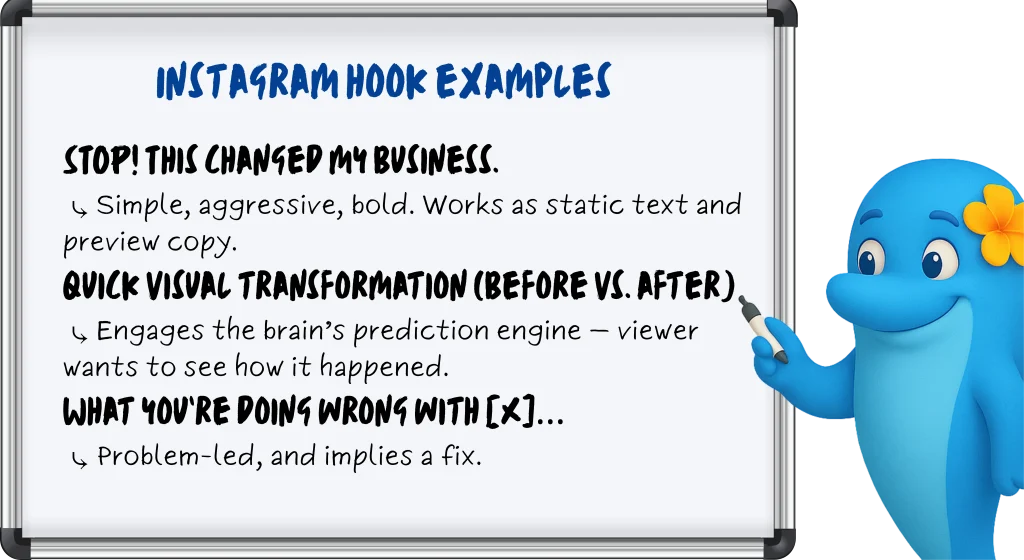
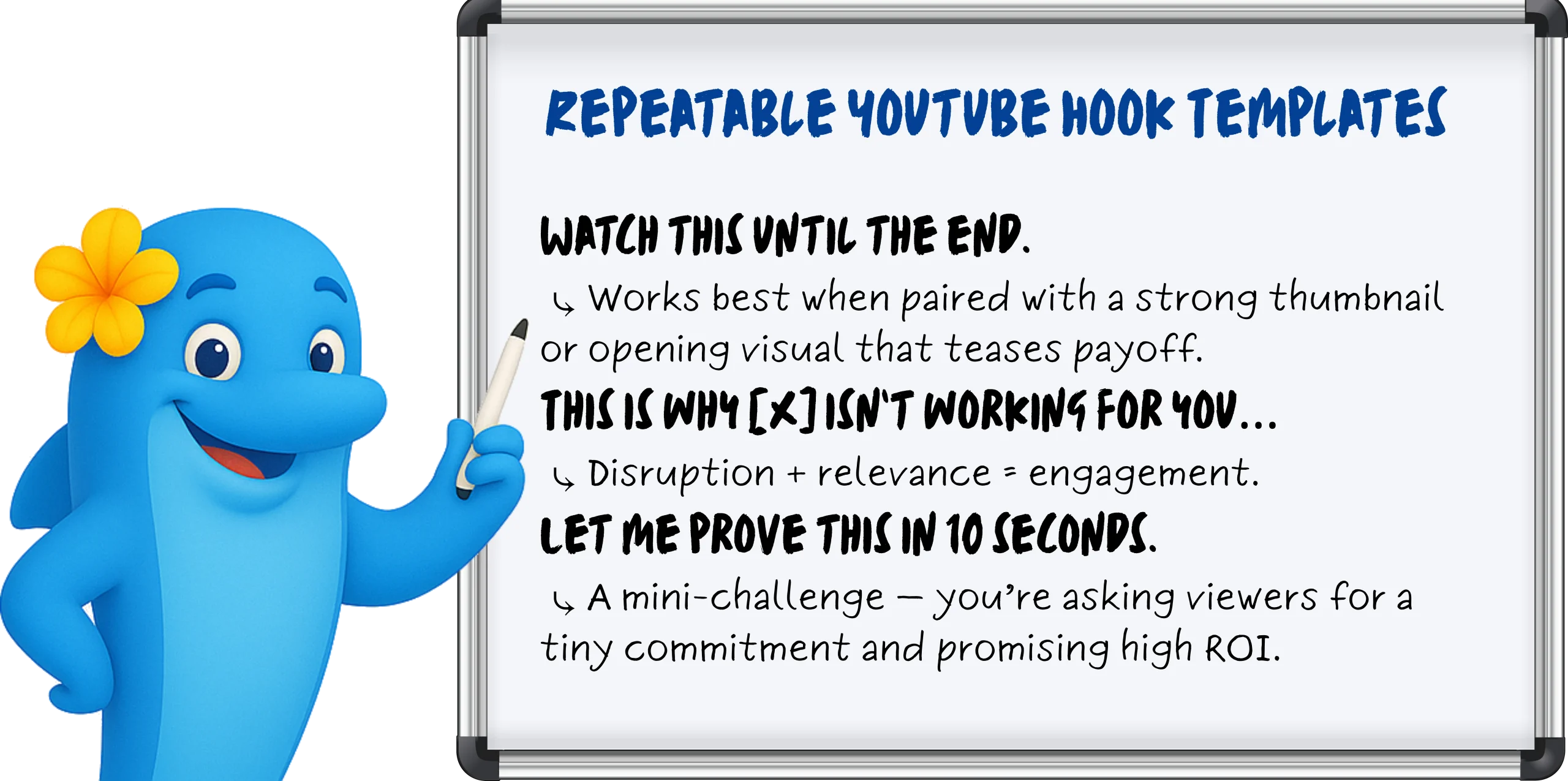
    Repeatrable Youtube hook templates

    Instagram Reels: Shock, Sound, Overlay

    Instagram Reels doesn’t reward slow burns — it rewards sensory ambush. If YouTube Shorts is about pacing and narrative tension, Reels is about vibe and visual punch, often before the viewer even taps.

    Scroll-Stop Mechanisms That Work

    Your job? Interrupt the scroll within one second — visually or audibly.

    1. Trending Audio Cues (First Second or Bust)
    Instagram’s algorithm loves audio-native behavior. That means syncing your first second with a recognizable sound — a beat drop, a voiceover hook, or a viral soundbite — to instantly trigger familiarity.

    2. Timed Text Overlays (Preview-Optimized)
    Your first frame matters before the viewer even hits play. The preview frame is your thumbnail. Strategic creators time bold text overlays to appear in the first 0.3 seconds, so the hook is already visible in-feed.

    3. High-Contrast or Unexpected Visuals
    Surreal edits. Face-reacts. Props in weird places. Reels thrives on visual thumb-breakers that contrast with lifestyle content around it. If your face fills the frame and your eyes say “wait for it” — it works.

    Reels Editing Tips That Actually Matter

    • Time your text overlays to appear in the first 0.3 seconds
      Anything slower risks being cut off in preview mode — aka, your hook dies before it lives.
    • Always check your preview frame before posting
      What shows in-feed is what earns the click. A dead frame = dead reach.
    • Keep the first 1–2 seconds hyper-visual and reactive
      Even if you’re talking, make the viewer feel like they’re missing something if they scroll.
    Instagram hooks

    LinkedIn Carousels: First Slide = Battle Zone

    On LinkedIn, the first slide isn’t an intro — it’s a knife fight for attention. Forget clever setups or brand-heavy titles. If your lead slide doesn’t provoke curiosity, urgency, or ego in under a second, you’ve already lost the click.

    What Actually Makes People Swipe

    1. Stat-Based Hooks That Challenge or Alarm
    Cold, hard numbers perform well — especially when they suggest most people are doing something wrong.

    Example Slide 1: “78% of marketers miss this — are you one of them?”

    Why it works: Social proof meets FOMO. Feeds into ego, curiosity, and self-assessment — all at once.

    2. Provocative Questions That Poke at Pain Points
    Challenge the reader’s status quo. Swipe-worthy carousels open with a line that hits where it hurts — budget, performance, perception.

    Slide 1: “Are your campaigns bleeding money?”

    Slide 1: “Your boss cares about ROI. Show this.”

    Why it works: LinkedIn users are job-focused — pain + solution = performance.

    3. Visual Hierarchy & Contrast
    Big fonts. Bold text. Negative space. Colors that don’t blend in with the sea of blue and beige. The first slide should feel like a bold poster — not a polite cover.

    Slide 1: “Most social strategies suck. Here’s why yours might too.”

    Why it works: No fluff, no intro, just friction and value in one frame.

    Best Practices That Actually Drive Swipes

    • Ditch the logo: You’re not Coca-Cola. The first slide is for the reader, not your brand team.
    • Never waste the slide on a title: If it reads like a headline from a blog post, it’s already being ignored. Make it punch, not label.
    • Add swipe cues: Use arrows, broken lines, or subtle animation to create movement and momentum — your carousel should feel like a journey.

    How BlueKona Can Analyze Which of Your Hooks Actually Work

    You’ve posted. You’ve hoped. Maybe even prayed to the algorithm gods. But which hooks actually worked — and which ones got ghosted?

    BlueKona takes the guesswork out of performance. It analyzes your posts across platforms — YouTube Shorts, Instagram Reels, LinkedIn Carousels — by impressions vs. engagement, so you can see exactly which hooks stopped the scroll… and which ones got scrolled right past.

    You’ll know:

    • Which posts had high visibility but low engagement (aka, hook fail)
    • Which ones spiked interaction right at the top (aka, hook magic)
    • How performance shifts by platform and format
    • Which opening frames or phrases actually pull people in

    No more gut instinct. No more guessing. Just clear, scroll-stopping insight.

  • How to Audit Your Instagram Account: A Step-by-Step Guide to Boost Performance

    How to Audit Your Instagram Account: A Step-by-Step Guide to Boost Performance

    Instagram is more than just a social media app—it’s a powerful growth engine for brands, creators, and businesses. But without a clear roadmap, you’re essentially flying blind: posting content, hoping for engagement, and wondering why growth stalls. 

    That’s where an Instagram audit comes in. By regularly reviewing your profile, content, audience, and competitors, you’ll uncover hidden opportunities, refine your strategy, and boost performance. 

    Whether you’re a local shop or a global brand, this step-by-step audit will give you the insights you need to evaluate key areas (profile, content, audience, and metrics), and turn your Instagram into your most reliable marketing channel. 

    What is an Instagram audit? 

    An Instagram audit is a systematic review of your profile, content, audience, and performance metrics to uncover strengths and opportunities for improvement. 

    Why audit your Instagram account? 

    Regular audits help you boost engagement, sharpen your content strategy, and adapt to Instagram’s ever-changing algorithm—making your posts more discoverable both by users and by AI-driven search engines.

    Steps to Audit Your Instagram Account

    Ready to turn your Instagram from guesswork into a growth machine? 

    Follow these four straightforward steps, and you’ll uncover exactly what’s working, what needs tweaking, and how to take action. An effective audit empowers you to optimize your profile, content, audience, and performance metrics—so you can boost engagement, sharpen your strategy, and stay ahead of algorithm changes.

    Step 1: Preparation — Tools and Setup

    Instagram Social media audit tools

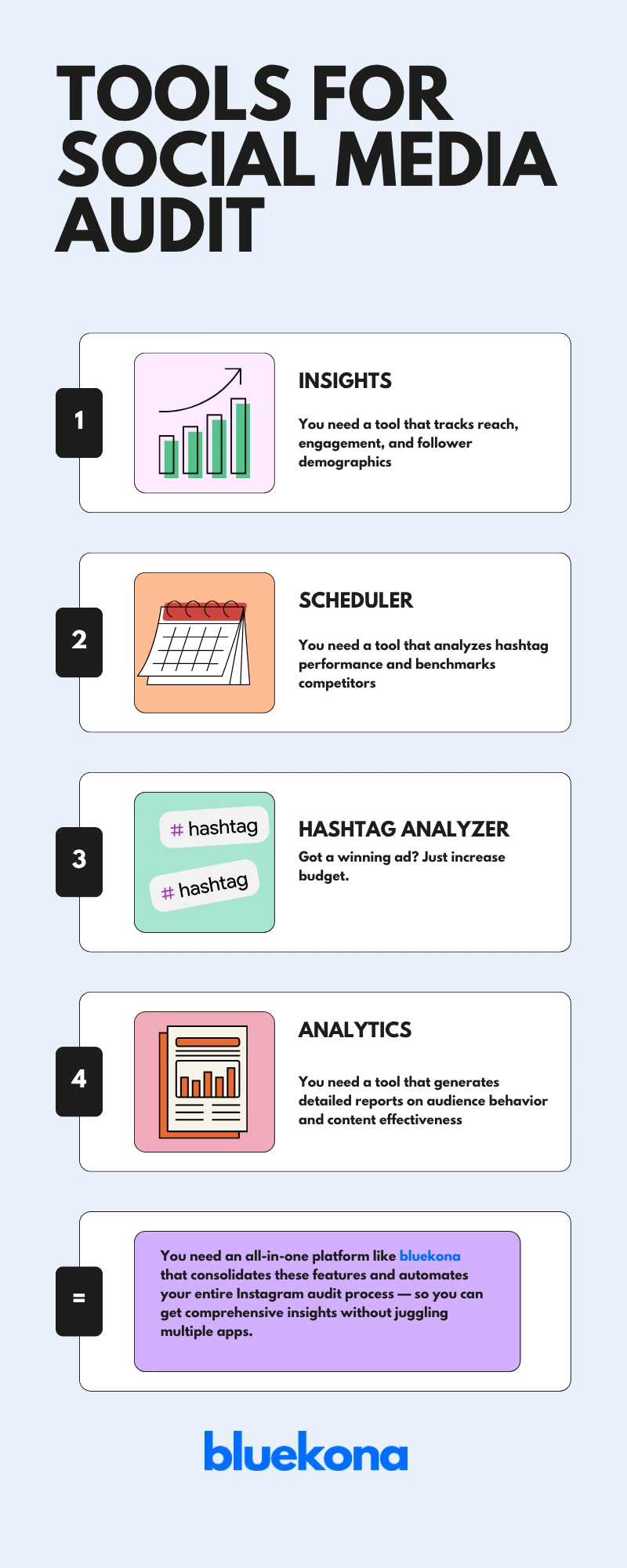
    Before diving into your audit, gather the right tools to streamline data collection and analysis. Here are the essentials:

    • Instagram Insights tracks reach, engagement, and follower demographics.
    • Hootsuite schedules posts and monitors performance trends across multiple accounts.
    • Iconosquare analyzes hashtag performance and benchmarks competitors.
    • Sprout Social generates detailed reports on audience behavior and content effectiveness.

    Pro Tip: Opt for an all-in-one platform like BlueKona that consolidates these features and automates your entire Instagram audit process — so you can get comprehensive insights without juggling multiple apps.

    Step 2: Conduct Your Instagram Audit — Key Areas to Review

    Now that you’ve gathered your tools, it’s time to dive into your audit. We’ll break this into four key areas—profile, content, audience, and metrics—so you can tackle each systematically.

    2.1 Profile Audit

    Goal: Make a killer first impression.

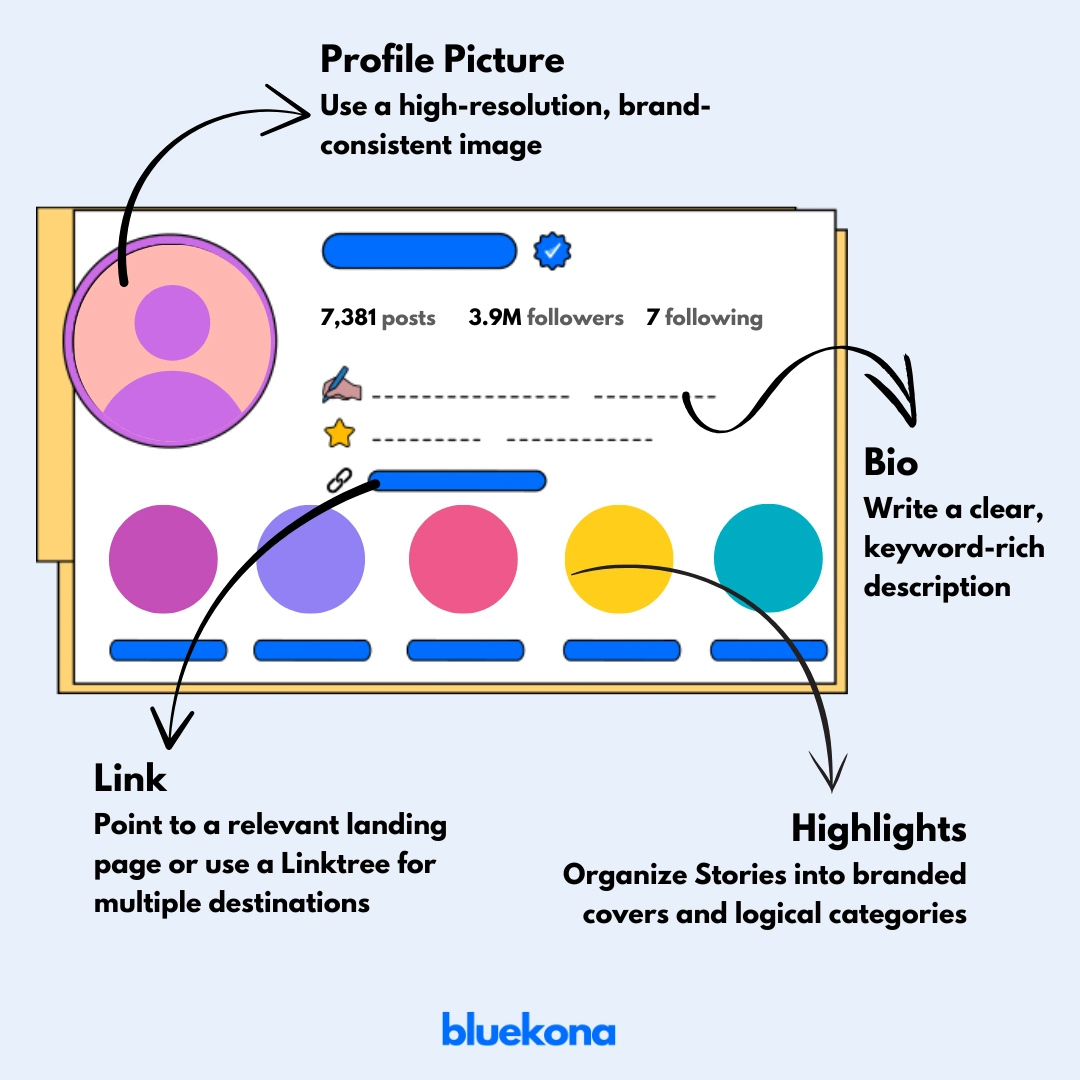
    Instagram Profile Audit
    • Profile Picture: Use a high-resolution, brand-consistent image.
    • Bio: Write a clear, keyword-rich description (e.g., “LA Fitness Coach”) with a call-to-action.
    • Link: Point to a relevant landing page or use a Linktree for multiple destinations.
    • Highlights: Organize Stories into branded covers and logical categories

    Action: Update any outdated details, tighten your bio copy, and swap in fresh highlight covers.

    2.2 Content Audit

    Goal: Identify your top performers and gaps.

    Instagram Content Audit
    • Post Types: Compare Reels, carousels, single images, and Stories.
    • Captions: Test short vs. long, question-based hooks vs. straight facts.
    • Hashtags: Review relevance, reach, and engagement of your tags for each post.
    • Frequency: Check if you’re posting consistently—aim for at least 3–5 times per week.

    Action: Flag your best 10 posts and analyze what made them work (format, caption style, timing).

    2.3 Audience Audit

    Goal: Know who’s engaging with you and when.

    Instagram-Audience-Audit
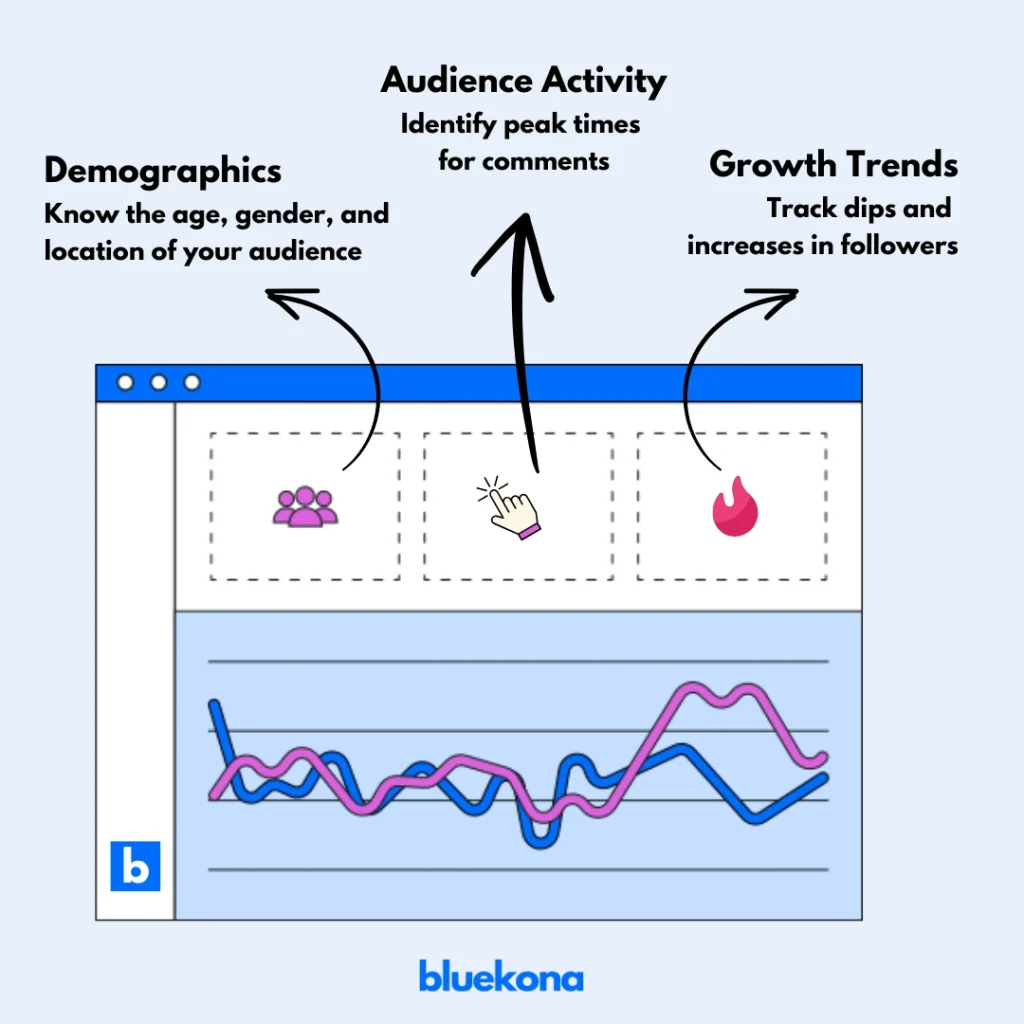
    • Demographics: Age, gender, and location insights from Instagram Insights.
    • Activity: Identify peak times for comments, DMs, and Story interactions.
    • Growth Trends: Chart follower increases or dips over the last 3–6 months.

    Action: Adjust your posting schedule to match when your audience is most active.

    Performance Metrics

    Goal: Measure success with hard numbers.

    Instagram Performance Metrics
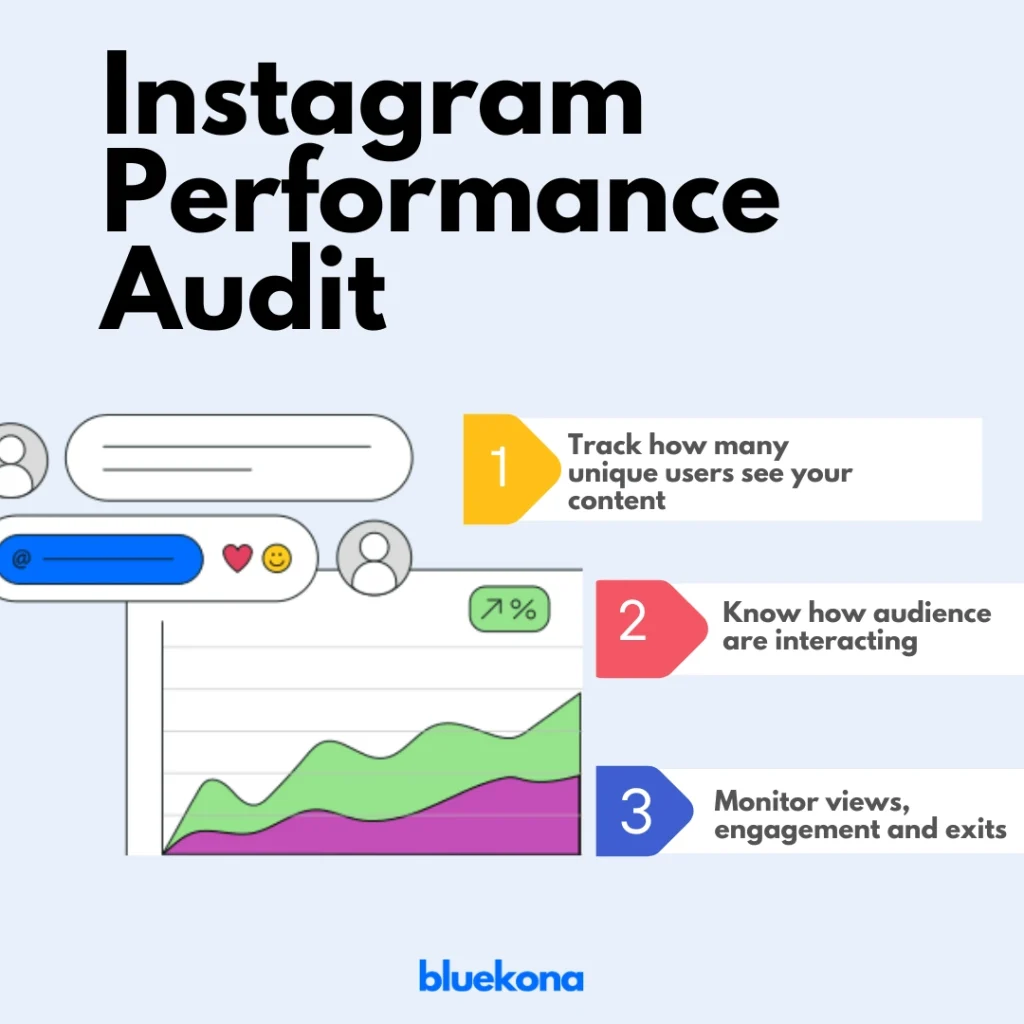
    • Reach & Impressions: Track how many unique users see your content.
    • Engagement Rate: Calculate (likes + comments + saves) ÷ followers.
    • Story Performance: Monitor view counts, forward taps, and exits.

    Action: Set benchmarks for each metric and identify any content types that consistently miss the mark.

    With these four areas audited, you’ll have a clear map of strengths, weaknesses, and quick-win opportunities.

    Step 3: Turn Insights into Action

    Your audit has revealed what’s working—and what isn’t. Now it’s time to act on those findings to boost performance and engagement.

    Follow these targeted tactics based on common audit outcomes:

    • If engagement is low on static posts:
      Experiment with Reels or carousel posts. Video formats often drive higher reach and saves.
    • If follower growth has stagnated:
      Refresh your hashtag strategy—mix niche, location-based, and trending tags. Or partner with micro-influencers in your niche to tap new audiences.
    • If your bio isn’t converting:
      Rewrite it with a stronger call-to-action (e.g., “Book your free consult today!”) and include a keyword relevant to your audience.
    • If certain content types underperform:
      Repurpose top-performing posts into different formats (e.g., turn a high-engagement carousel into a short Reel).
    • If your posting schedule is inconsistent:
      Use instagram’s scheduling features to plan and maintain a steady content calendar—aim for 3–5 quality posts per week.

    Step 4: Keep Auditing

    An Instagram audit isn’t a one-and-done task—it’s a continuous cycle of review, action, and refinement.

    Schedule your next audit every 3–6 months, or after any major campaign, to stay ahead of trends and algorithm shifts.

    • Review your checklist: Revisit each audit area—profile, content, audience, and metrics—to ensure your improvements stick.
    • Measure progress: Compare new metrics against your audit benchmarks to see what’s working.
    • Iterate quickly: Double down on successful tactics and pivot away from underperforming ones.

    By making audits a habit, you’ll not only maintain peak performance but also uncover fresh opportunities to engage your audience, grow your following, and outshine competitors.

    Wrap Up

    Auditing your Instagram account turns guesswork into strategy. By regularly reviewing your profile, content, audience, and metrics, you’ll spot what’s working, uncover hidden gaps, and fuel continuous growth.

    Remember, social media isn’t static—algorithms change, audiences evolve, and new features emerge.

    Scheduling an audit every 3–6 months keeps you agile and ahead of the curve.

    Ready to supercharge your strategy? Connect your Instagram account and run your audit, and watch your engagement, reach, and conversions climb.

    Your best Instagram performance is just one audit away!

  • How to Connect Your Instagram Account to Meta Business Suite (And Save a Ton of Time)

    How to Connect Your Instagram Account to Meta Business Suite (And Save a Ton of Time)

    If you’re serious about growing your Instagram presence and saving time while doing it, then Meta Business Suite is your new best friend. It’s the all-in-one tool that lets you create, manage, and monetize your content from one central dashboard.

    Whether you’re a solo creator or managing multiple brands, here’s how to get started.

    Step 1: Make Sure You Have the Right Instagram Account

    Before you dive in, make sure your Instagram account is either a Business or Creator account. If you’re still on a personal profile, go switch it now — it’s quick and essential if you want access to full features.

    Managing Instagram Without a Facebook Page? Here’s What to Do:

    Yes, you can use Meta Business Suite even if your Instagram isn’t linked to a Facebook Page. Here’s how:

    Trouble Logging In?

    If Meta is asking you to connect to a Facebook Page (and you don’t want to), try this:

    • Option 1: Log out of your Facebook profile, then go back to Meta Business Suite and log in with Instagram only.
    • Option 2: Use a private or Incognito browser, then log in using your Instagram credentials.

    Want to Manage Instagram AND a Facebook Page Together?

    Smart move. When you connect both your Instagram account and Facebook Page, you can manage everything in one seamless workflow. Here’s what you can do:

    Option 1: Connect Instagram to Your Facebook Page

    Once connected, they’ll appear as one unified profile inside Meta Business Suite. You can set this up from:

    • The Instagram app
    • Your Facebook Page settings

    Option 2: Add Both Accounts to a Business Portfolio

    Not ready to connect them directly? You can still add them under the same business portfolio. This way, they stay separate but are still manageable under one roof in Meta Business Suite.

    ⚠️ Heads up: Adding your Instagram account to a business portfolio doesn’t automatically link it to your Facebook Page.

    More Resources to Help You Win

    Final Tip

    If you’re juggling multiple Pages or Instagram accounts, Meta Business Suite can save you hours every week. Centralize your content, plan ahead, and focus on growing your brand — not fighting with logins.