There’s a quiet shift happening on LinkedIn that most marketing teams haven’t caught on to yet.
LinkedIn has been slowly changing what it rewards. It now pushes long-form posts, original thinking, structured content, and real expertise. The platform is nudging people away from quick engagement plays and toward content that actually teaches something.
This is not a random design decision. LinkedIn is building toward becoming a place where people search for knowledge, not just scroll through updates.
And that changes everything about how you should be showing up there.
The problem with chasing likes
Most companies use LinkedIn like a broadcasting channel. Post the blog recap. Share the team photo. Drop a motivational quote on Monday morning. Watch the likes come in. Move on.
That approach feels productive, but it builds nothing over time.
A post that gets 500 likes today will be completely invisible by Thursday. The engagement was real, but it left no trace. Nobody finds it a month later. It does not help someone discover your brand when they search for a topic you cover.
Searchable content works differently. A well-written article or a post that actually explains something useful can keep pulling in new readers for months. People find it through search. AI tools surface it when someone asks a related question. It keeps working long after you stopped thinking about it.
That is the difference between content that performs and content that compounds.
LinkedIn content is now an SEO asset
Here is something most brands have not fully accepted yet: your LinkedIn posts are being indexed by Google.
LinkedIn articles especially. When someone searches for a topic, LinkedIn content shows up in results. And as AI-powered search tools get better at pulling in expert opinions and structured knowledge, the brands that have built a consistent body of work on LinkedIn will have a real advantage.
Think about what people actually search for on LinkedIn. They search for founders by name. They look up companies before a sales call. They search for opinions on a specific topic. They look for people who seem to know a lot about a problem they are trying to solve.
If your content does not show up in those searches, you are invisible at exactly the moment someone is looking for you.
What actually works in this new environment
Not all LinkedIn content is created equal when it comes to discoverability. Here is what tends to perform well over time.
Original perspective. Repeating what everyone else is saying does nothing for your authority. When you share a genuine point of view, especially one that challenges a common assumption, people remember it.
Clear structure. Posts that are easy to skim and read on a phone tend to reach more people. Short paragraphs, clear breaks, a strong opening line.
Language people actually search for. Write the way someone would type a question into a search bar. What would they ask? Answer that.
Real depth. Insight beats inspiration every time. One well-explained idea will do more for your reputation than ten motivational posts.
Content that stays useful. A post explaining how to think about a specific business problem will still be relevant a year from now. A post about a trending news story will not.
What most brands are still doing wrong
The habits that used to work on LinkedIn are now working against you if you are trying to build long-term discoverability.
Engagement bait gets likes but no recall. When someone sees your brand name three months later, they will not remember what you said.
Reposting your blog does not build authority. It just moves existing content to a different channel without adding anything.
Chasing trends that have nothing to do with your expertise makes you look like you are just filling a content calendar.
Generic corporate tone makes every post forgettable. People do not connect with a brand voice that sounds like it was written by a committee.
The bigger shift in how you need to think about content
The brands that are winning on LinkedIn right now are not posting more. They are posting with a clear point of view, consistently, on a specific set of topics.
Over time, they become the brand you think of when a certain topic comes up. That kind of recall is worth far more than any single viral post.
But most companies do not have a system for figuring out which topics are building that recognition, which posts people keep coming back to, or which ideas deserve to be expanded into something bigger. They post, check the engagement numbers, and move on.
That is where most of the value gets left on the table.
What this means for your LinkedIn strategy
Stop thinking about LinkedIn as a place to distribute content. Start thinking about it as a place to build a searchable body of knowledge about your area of expertise.
That means publishing content with some depth to it. It means writing in a way that answers real questions. It means staying consistent on a few topics long enough that people start to associate your brand with those ideas.
It also means paying attention to what is actually working, not just what is getting likes. Which posts bring in new followers weeks after they were published? Which topics keep coming up in comments? Which content seems to spark real conversations rather than just passive scrolling?
The brands that figure that out will have a significant advantage as LinkedIn continues to shift from a social feed into something closer to a professional knowledge engine.
The ones still chasing likes will keep wondering why their content never seems to build any momentum.
The scroll is ruthless. You have ~3 seconds to hook — or die.
Every platform’s algorithm,from YouTube to Instagram to LinkedIn, is designed to reward content that grabs attention instantly. Not eventually. Instantly. Weak openings? They get buried.
In this post, we’ll break down exactly what makes a powerful first three seconds on YouTube Shorts, Instagram Reels, and LinkedIn Carousels. You’ll see real examples, repeatable hook formulas, and data-backed strategies to improve your scroll-stop rate — no matter the platform.
If your job depends on getting people to watch, read, or engage, this is where you start.
Why the First 3 Seconds Matter ?
The first three seconds aren’t just important — they’re make-or-break. In a feed moving faster than a caffeine-fueled scroll session, attention isn’t given. It’s earned instantly.
Viewer Drop-Off Rates Don’t Lie
YouTube Shorts: According to YouTube’s own Creator Insider, a staggering 70% of viewers decide whether to keep watching or swipe away within the first 3 seconds. That’s your entire pitch window.
Instagram Reels: Meta’s internal research shows that the average viewer gives a Reel just 1.7 seconds before deciding if it’s worth their time. That’s less than two blinks — your visual or audio cue needs to hit immediately.
LinkedIn Carousels: LinkedIn’s Ads Benchmark Report reveals that if your first slide lacks contrast or punchy copy, CTRs can drop by over 50%. On a platform where users skim while pretending to read, the first visual has to do the heavy lifting.
Platform Behavior You Can’t Ignore
Users don’t watch — they scan. You’re competing with subconscious thumb reflexes, not just other creators.
Algorithms boost content that causes users to hesitate, rewatch, or interact right away. The quicker you trigger that pause, the better your odds of reach.
Your first frame is algorithmic currency. If it doesn’t hook, it doesn’t rank.
YouTube Shorts: What Grabs & Keeps
When it comes to YouTube Shorts, the first three seconds are less of an opening and more of a grenade. They need to explode fast, loud, and with purpose. Unlike longer-form YouTube content, there’s zero patience for buildup. The best-performing Shorts punch the viewer with motion, tension, or curiosity — immediately.
What Works in the First 3 Seconds
1. Hard Cuts & Pattern Disruption The scroll stops when something breaks the feed’s rhythm. Think jarring transitions, zooms, sudden audio bursts — anything that snaps the brain awake. The goalis to disrupt the default passive scroll.
2. Immediate Voiceovers Top creators open with lines like:
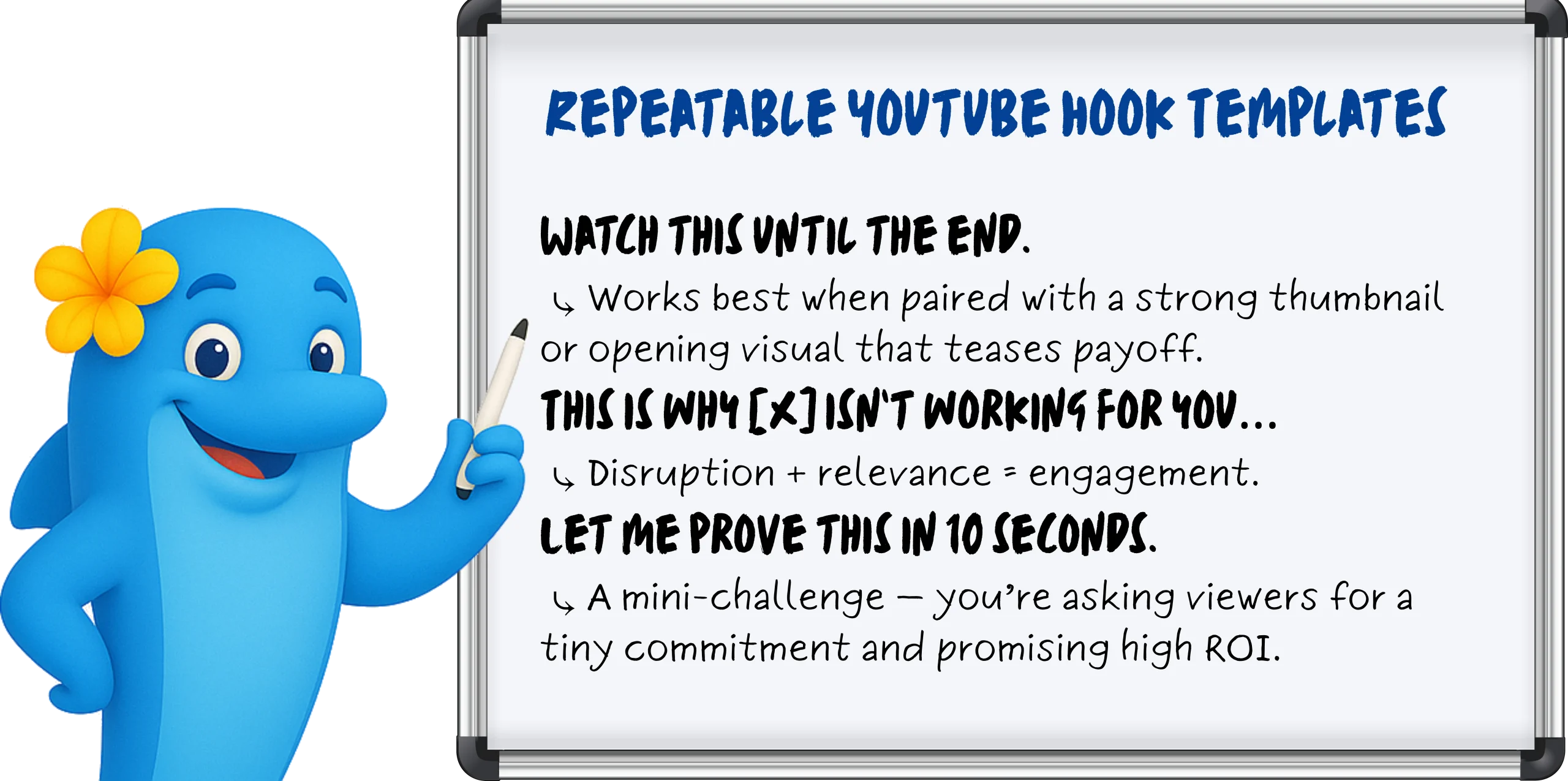
“Here’s what nobody tells you about [topic]…”
“You’ve been doing this wrong — let me show you why.”
The pattern? They open with tension, contradiction, or a bold promise — within the first breath.
3. Motion-Heavy or Unexpected Visuals Whether it’s fast jump cuts, punch-ins on facial expressions, or text that animates with meaning — static = skipped. Viewers are drawn to movement, so even talking heads layer in kinetic typography, visual overlays, or reaction-style inserts to hold attention.
Instagram Reels: Shock, Sound, Overlay
Instagram Reels doesn’t reward slow burns — it rewards sensory ambush. If YouTube Shorts is about pacing and narrative tension, Reels is about vibe and visual punch, often before the viewer even taps.
Scroll-Stop Mechanisms That Work
Your job? Interrupt the scroll within one second — visually or audibly.
1. Trending Audio Cues (First Second or Bust) Instagram’s algorithm loves audio-native behavior. That means syncing your first second with a recognizable sound — a beat drop, a voiceover hook, or a viral soundbite — to instantly trigger familiarity.
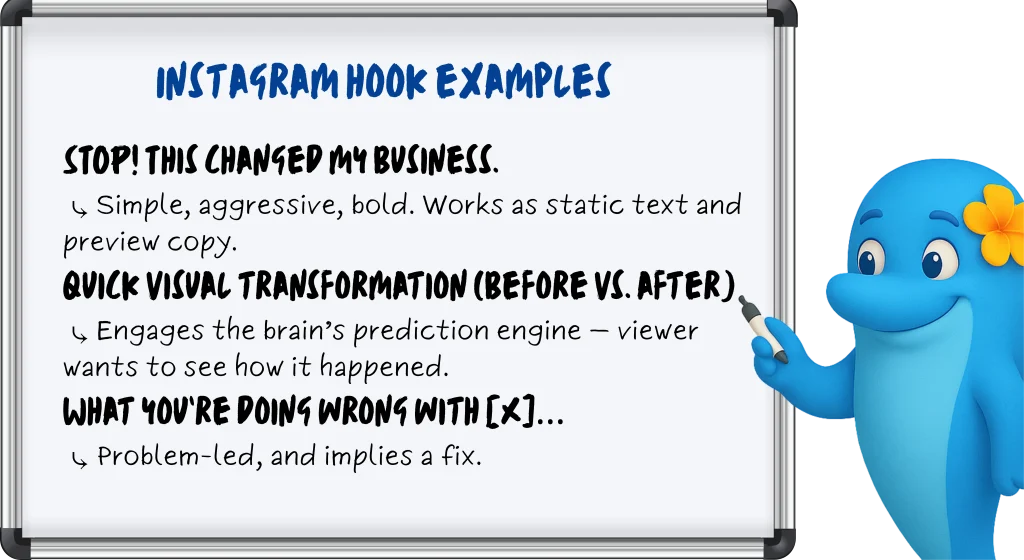
2. Timed Text Overlays (Preview-Optimized) Your first frame matters before the viewer even hits play. The preview frame is your thumbnail. Strategic creators time bold text overlays to appear in the first 0.3 seconds, so the hook is already visible in-feed.
3. High-Contrast or Unexpected Visuals Surreal edits. Face-reacts. Props in weird places. Reels thrives on visual thumb-breakers that contrast with lifestyle content around it. If your face fills the frame and your eyes say “wait for it” — it works.
Reels Editing Tips That Actually Matter
Time your text overlays to appear in the first 0.3 seconds Anything slower risks being cut off in preview mode — aka, your hook dies before it lives.
Always check your preview frame before posting What shows in-feed is what earns the click. A dead frame = dead reach.
Keep the first 1–2 seconds hyper-visual and reactive Even if you’re talking, make the viewer feel like they’re missing something if they scroll.
LinkedIn Carousels: First Slide = Battle Zone
On LinkedIn, the first slide isn’t an intro — it’s a knife fight for attention. Forget clever setups or brand-heavy titles. If your lead slide doesn’t provoke curiosity, urgency, or ego in under a second, you’ve already lost the click.
What Actually Makes People Swipe
1. Stat-Based Hooks That Challenge or Alarm Cold, hard numbers perform well — especially when they suggest most people are doing something wrong.
Example Slide 1: “78% of marketers miss this — are you one of them?”
Why it works: Social proof meets FOMO. Feeds into ego, curiosity, and self-assessment — all at once.
2. Provocative Questions That Poke at Pain Points Challenge the reader’s status quo. Swipe-worthy carousels open with a line that hits where it hurts — budget, performance, perception.
Slide 1: “Are your campaigns bleeding money?”
Slide 1: “Your boss cares about ROI. Show this.”
Why it works: LinkedIn users are job-focused — pain + solution = performance.
3. Visual Hierarchy & Contrast Big fonts. Bold text. Negative space. Colors that don’t blend in with the sea of blue and beige. The first slide should feel like a bold poster — not a polite cover.
Why it works: No fluff, no intro, just friction and value in one frame.
Best Practices That Actually Drive Swipes
Ditch the logo: You’re not Coca-Cola. The first slide is for the reader, not your brand team.
Never waste the slide on a title: If it reads like a headline from a blog post, it’s already being ignored. Make it punch, not label.
Add swipe cues: Use arrows, broken lines, or subtle animation to create movement and momentum — your carousel should feel like a journey.
How BlueKona Can Analyze Which of Your Hooks Actually Work
You’ve posted. You’ve hoped. Maybe even prayed to the algorithm gods. But which hooks actually worked — and which ones got ghosted?
BlueKona takes the guesswork out of performance. It analyzes your posts across platforms — YouTube Shorts, Instagram Reels, LinkedIn Carousels — by impressions vs. engagement, so you can see exactly which hooks stopped the scroll… and which ones got scrolled right past.
You’ll know:
Which posts had high visibility but low engagement (aka, hook fail)
Which ones spiked interaction right at the top (aka, hook magic)
How performance shifts by platform and format
Which opening frames or phrases actually pull people in
No more gut instinct. No more guessing. Just clear, scroll-stopping insight.
With over 930 million professionals on LinkedIn as of 2025, your company page is more than just an online brochure—it’s a dynamic hub for networking, thought leadership, and lead generation.
But are you truly leveraging its full power?
A systematic LinkedIn page audit helps you pinpoint what’s working, uncover hidden gaps, and adapt to the platform’s rapid evolution—over 50 feature updates in 2024 alone.
In this comprehensive guide, we’ll walk you through a step-by-step audit process tailored for 2025’s LinkedIn landscape. You’ll learn how to define SMART goals, optimize your page setup, refine team profiles, analyze content performance, benchmark against competitors, and tap into new features like enhanced video discovery and post analytics.
Whether you’re a small business, a B2B marketer, or an HR leader, these strategies will ensure your LinkedIn presence drives real engagement, attracts top talent, and supports your broader business objectives.
Ready to transform your LinkedIn page from a static profile into a growth engine? Let’s dive in.
Why Conduct a LinkedIn Page Audit?
Simply posting updates isn’t enough—LinkedIn is constantly evolving, and what worked last year may underperform today. A regular LinkedIn page audit ensures you’re:
Aligned with Your Goals Are you aiming for brand awareness, lead generation, or talent acquisition? An audit confirms your content and activity directly support those objectives—and highlights gaps where you can refocus.
Speaking to the Right Audience LinkedIn analytics reveal who’s following you—industries, job titles, locations, and more. Use those insights to tailor posts that resonate, rather than broadcasting generic updates.
Maximizing Feature Use With over 50 updates rolled out in 2024—like post scheduling, enhanced video analytics, and interactive carousels—an audit spotlights new tools you may be overlooking.
Staying Competitive Your competitors are also optimizing. By benchmarking their growth, content mix, and engagement tactics, you can identify opportunities to differentiate and lead in your niche.
Driving Measurable Results An audit moves you beyond vanity metrics. You’ll track the right KPIs—follower growth, post performance, website clicks—and refine your strategy based on data, not guesswork.
A thorough audit keeps your LinkedIn page fresh, strategic, and geared for real business impact. Next up: defining clear, SMART goals to guide your audit process.
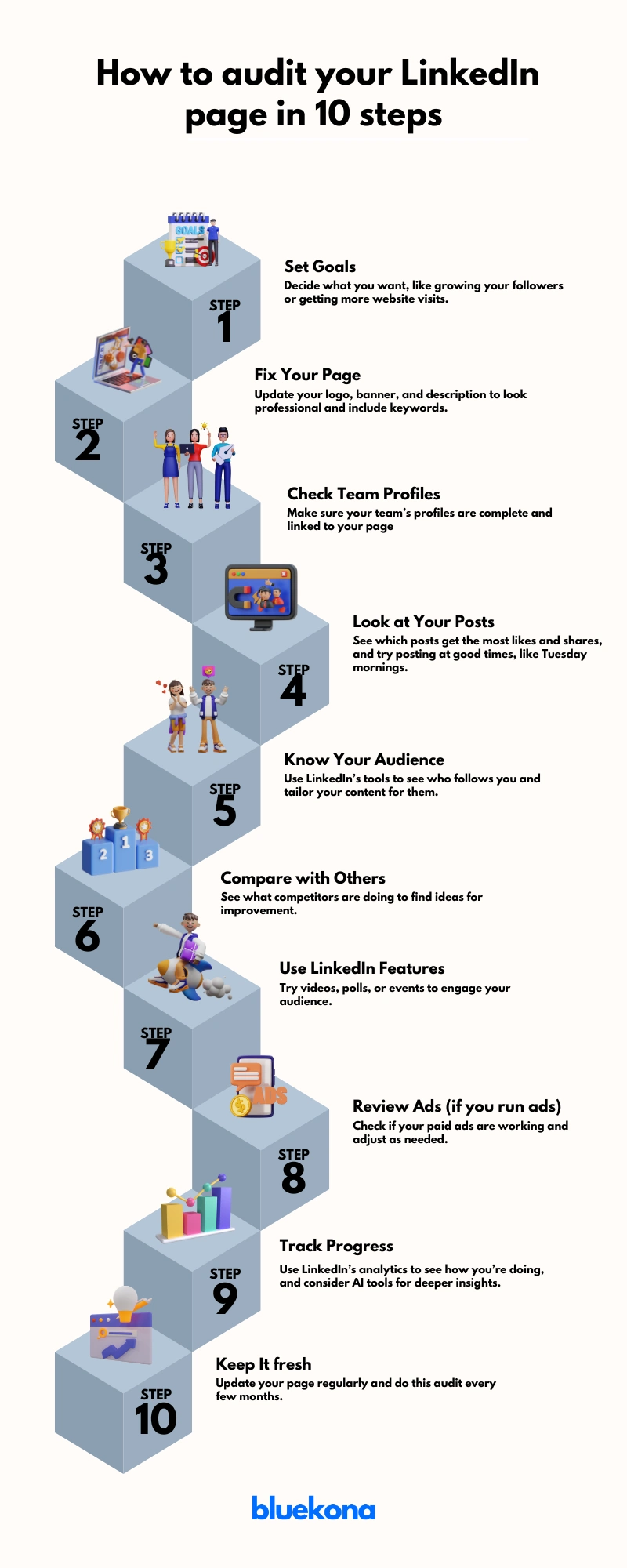
Step-by-Step Guide to Auditing Your LinkedIn Page
Ready to take action? Follow this clear, step-by-step guide to audit every aspect of your LinkedIn page—from profile setup to content strategy—so you can optimize performance and drive real results. Let’s jump in!
Step 1: Define Your LinkedIn Goals
Before you tweak banners or analyze posts, nail down why you’re auditing. Clear goals keep your efforts focused and measurable.
Brand Awareness: Grow your follower count by 20% in six months to increase top-of-funnel visibility.
Lead Generation: Drive a 15% lift in website clicks from LinkedIn by Q3 2025.
Talent Acquisition: Boost “Careers” page views by 25% to attract qualified candidates.
Thought Leadership: Increase post engagement (likes, comments, shares) by 10% on industry insights.
Actionable Tip: Make each goal SMART—Specific, Measurable, Achievable, Relevant, and Time-bound.
For example:“Secure 200 new followers and 50 website visits from LinkedIn in 3 months by posting weekly case studies.”
Jot down your goals, then align every audit step to them. Next, we’ll optimize your page setup to support these objectives.
Step 2: Optimize Your Company Page
Your LinkedIn Company Page is your digital storefront. If it looks outdated or incomplete, you’re losing trust—and traffic.
Profile Essentials
Logo: Upload a high-res, professional logo (300×300 px). This is what shows in search and employee profiles.
Banner Image: Use a branded image (1128×191 px) that reflects your identity. Add a CTA like “Follow us for weekly insights.”
Headline: Craft a keyword-rich tagline. Example: “B2B SaaS for Growth-Driven Teams | Trusted by 10,000+ Users.”
About Section
First 156 characters count most—they show up in previews. Hook readers with your value prop early.
Full Description (up to 2,000 characters): Cover mission, solutions, audience, and a strong CTA.
Include a link to your website and add relevant keywords naturally—no keyword stuffing.
Additional Fields
Industry, company size, and specialties boost discoverability.
Set a custom button (like “Contact Us” or “Visit Website”) to drive conversions.
SEO Tip: Customize your page URL (e.g., linkedin.com/company/yourbrandname) and sprinkle in location-based terms if relevant.
Data Point: LinkedIn says pages with complete info get 30% more weekly views.
Next, we’ll make sure your team is aligned and optimized as brand advocates.
Step 3: Enhance Team Profiles
Your team members are brand ambassadors, and their profiles impact your company’s reputation. Ensure:
All team members have professional profile pictures, preferably showing their faces for recognizability.
Profiles are tagged on the company page to show association.
Consider using LinkedIn’s Employee Advocacy Program to track and encourage employees to share company content, as they are 14x more likely to engage, boosting brand awareness. Actionable tip: Host a workshop to guide employees on optimizing their profiles and sharing content effectively
Step 4: Analyze and Refine Content Strategy
Content is your LinkedIn engine—it drives visibility, engagement, and conversions. But not all content performs equally. This step is about using data to guide your efforts.
Review Post Performance
Dive into LinkedIn Analytics and look at:
Impressions & Reach – Are people seeing your posts?
Text Posts – Great for storytelling and thought leadership.
Image Carousels – High-performing for guides, tips, and visual storytelling.
Videos – Get 20x more shares than other types (LinkedIn, 2024).
Polls – Excellent for boosting engagement and feedback.
Articles – Ideal for deep dives and authority building.
Pro Tip: Posts with multiple images tend to drive more engagement than single-image posts (Socialinsider, 2024).
Best Time to Post
Based on 2024 data, optimal windows are:
Tues–Thurs, 8 AM–2 PM (local time)
Fridays at 11 AM or 12 PM also see strong engagement
Test and refine based on your own analytics.
Engagement Practices
Reply to every comment—quickly. This boosts reach and builds community.
Tag relevant employees or partners when appropriate to amplify visibility.
Actionable Tip: Create a monthly content calendar with a mix of insights, updates, videos, and community features. Track each post’s success and adjust as needed.
Next up: let’s get specific about your audience and how to tailor content for them.
Step 5: Understand Your Audience
You can’t engage if you don’t know who you’re talking to. This step is about turning data into understanding—and understanding into content that connects.
Demographic Insights
Use LinkedIn’s built-in analytics to uncover:
Job Functions – Are they marketers, HR professionals, or C-level execs?
Seniority Levels – Entry, mid, senior, or decision-makers?
Industries & Company Sizes – Are you attracting startups, enterprises, or something in between?
Locations – Where is your audience based?
Knowing this helps you shape your tone, topics, and content formats.
Example: If most of your followers are mid-level IT professionals at large firms, focus on actionable insights, career growth, and technology trends—not beginner guides or broad thought leadership.
Engagement Data
Look beyond who they are—analyze what they care about:
Which posts get the most likes, shares, and comments?
What topics generate conversation?
Do videos or carousels resonate more with your top segments?
Trend to Watch (2025): Audience filters now let you see how different content types perform across segments (e.g., HR managers vs. operations leads). Leverage this to fine-tune content delivery.
Tailored Content = Higher Impact
Segment your audience in your planning process.
Create specific content for each segment (e.g., industry reports for execs, how-to guides for junior roles).
Speak their language—solve their challenges.
Actionable Tip: Create 2–3 audience personas based on LinkedIn data. Write posts specifically targeting each persona at least once per month.
Step 6: Benchmark Against Competitors
To stand out, first you need to know where you stand.
Benchmarking your LinkedIn presence against competitors reveals strategic gaps, performance benchmarks, and content opportunities that can set your brand apart.
Identify Your Competitors
Start with 3–5 companies that:
Offer similar products/services
Target the same audience
Actively publish content on LinkedIn
Use LinkedIn search or tools like Sales Navigator to shortlist these brands.
Look at:
Content types: Do they post more carousels, videos, or thought leadership?
Engagement: Are their posts sparking conversation?
Tone and visuals: How do they brand their messaging?
Learn and Differentiate
Steal like a strategist:
Adopt what works: If competitors get traction with polls or case studies—try your spin on it.
Spot the gaps: Are they ignoring employee stories or trending topics? You can fill that void.
Differentiate: Use your unique value prop or brand voice to stand out where others blend in.
Actionable Tip: Set up a monthly competitive content review. Use it to inspire campaigns, content formats, and engagement strategies.
Step 7: Leverage LinkedIn Features
Tap into LinkedIn’s built-in tools to amplify reach, engagement, and brand credibility.
LinkedIn is no longer just a job board—it’s a content platform, a video hub, and an event stage. If you’re not using its full feature set, you’re leaving visibility on the table.
Key Features to Use
Showcase Pages: Create dedicated pages for specific products, services, or sub-brands. Great for targeted audiences or campaigns.
Events & LinkedIn Live: Host webinars, AMAs, or workshops. These tools boost visibility and position your company as a thought leader.
Polls & Articles: Encourage interaction through polls. Use long-form articles to dive deep into topics your audience cares about.
Post Scheduling (2025 Update): Schedule content natively to stay consistent. No third-party tool needed.
“Videos for You” Feature: Leverage LinkedIn’s improved video discovery tool to boost reach. Short videos, behind-the-scenes clips, and explainers work best.
Premium Company Pages: If available to you, unlock enhanced analytics and audience insights.
Why It Matters
These features aren’t gimmicks—they’re algorithm-friendly, engagement-boosting tools designed to make your brand more visible. Companies that use video, events, and employee-generated content often outperform those that don’t.
Actionable Tip: Choose 2–3 features you’re not using today. Run a 30-day test and track engagement uplift.
Step 8: Review Paid Campaigns (If Applicable)
If you’re running LinkedIn ads, it’s time to dig into the data—not just spend and impressions, but real business outcomes.
Paid campaigns can supercharge your reach, but only if they’re aligned with your goals and targeted with precision. An audit ensures you’re not wasting budget on underperforming content or audiences.
What to Review
Campaign Objectives: Are your campaigns tied to clear goals—awareness, lead gen, or conversions? Match each ad to the appropriate funnel stage.
Targeting Accuracy: Reassess your audience filters — job titles, industries, company size, location. Narrow targeting often performs better on LinkedIn.
Creative Elements: Audit your headlines, visuals, CTAs, and ad formats (video vs. single image vs. carousel). A/B test what’s working.
Budget Allocation: Look at ROI per campaign. Double down on top-performers and pause or refine low-impact spend.
Conversion Tracking: Use LinkedIn’s Campaign Manager and conversion tracking to measure clicks, form fills, site visits, or job applicants.
Actionable Tip: Create a monthly reporting template that includes: 1. Spend vs. ROI 2. Top-performing creatives 3. CTR and conversion rates 4. Audience insights Use this to decide on ongoing optimization and justify budget increases—or cuts.
Step 9: Utilize Analytics and Tools
You can’t optimize what you don’t measure.
LinkedIn’s built-in analytics can uncover what’s working, what’s not, and what to do next.
An audit is only as good as the insights it delivers. Metrics help you validate strategy, fine-tune content, and prove ROI.
Page views
Key Areas to Monitor
Follower growth
Post impressions
Engagement rate (likes, comments, shares)
Click-throughs
Follower demographics
Monitor profile views driven by specific posts, and follower gains from video content. These fresh insights reveal what truly moves the needle.
While LinkedIn’s native tools are powerful, there are many platforms like HubSpot or Hootsuite that offer enhanced scheduling, reporting, and competitor tracking.
Actionable Tip: Avoid tool overload—choose a smart tool like Bluekona that not only provide analytics but also suggestions to level you up.
Step 10: Regularly Update and Re-audit
A single audit is powerful—regular audits are transformative. LinkedIn evolves quickly, and your business does too. Staying updated ensures your page never falls behind.
Why It Matters:
Algorithms shift. Features roll out. Your audience grows. A quarterly or monthly re-audit helps you adapt, stay competitive, and maintain momentum.
Actionable Tip: Create a repeatable checklist to make future audits easier and more efficient. Document what you review, what tools you use, and who’s responsible. This becomes your LinkedIn playbook.
Addressing Common Pitfalls
Even with a solid strategy, LinkedIn pages often underperform due to avoidable missteps. Spotting these early can save time, improve ROI, and keep your brand ahead.
Common LinkedIn Audit Mistakes (and How to Fix Them)
1. Neglecting Team Profiles Your employees are brand ambassadors. Incomplete or outdated profiles diminish credibility. Fix: Encourage team members to update photos, headlines, and link their profiles to the company page.
2. Ignoring Analytics If you’re not using LinkedIn’s built-in insights, you’re flying blind. Fix: Regularly review analytics to identify what’s working and double down.
3. Overlooking Competitor Benchmarks Without external reference points, your audit exists in a vacuum. Fix: Compare engagement, follower growth, and content strategy with 2–3 competitors quarterly.
4. Failing to Engage with Followers Publishing content is half the game—engagement builds trust and visibility. Fix: Respond to comments, DMs, and reactions. Set aside time weekly for community interaction.
5. Stale or Inconsistent Content Posting randomly or recycling outdated updates won’t keep your audience interested. Fix: Use a content calendar and mix in fresh formats like polls, carousels, and short-form videos.
6. Not Testing New Features LinkedIn constantly evolves. Skipping new features = missed opportunities. Fix: Test emerging tools like LinkedIn Live, post scheduling, and video carousels to stay ahead.
Pro Tip: Run a quarterly “Pitfall Checkup” alongside your audit to catch and correct these common issues. Small tweaks here can create massive improvements in performance.
The Role of AI in LinkedIn Audits
Artificial Intelligence is rapidly reshaping how brands approach LinkedIn optimization.
Gone are the days of manual guesswork—AI-driven insights now allow marketers to audit smarter, faster, and with greater accuracy.
Why AI Matters in Your LinkedIn Audit
Data-Backed Decisions: AI helps you uncover patterns in audience behavior, engagement trends, and content performance that human analysis might miss.
Content Optimization: AI tools can suggest best-performing post formats, optimal posting times, and even recommend keywords or hashtags tailored to your audience.
Real-Time Alerts: Track dips or spikes in metrics as they happen, allowing for faster course corrections.
BlueKona.ai—a specialized AI tool built to streamline LinkedIn audits for brands and agencies.
What BlueKona Does:
Analyzes your company page performance across data points.
Recommends actionable tasks prioritized by potential ROI.
Detects algorithm shifts and suggests strategy updates proactively.
💡 Example: Instead of guessing which post formats work, BlueKona might show you that carousels outperform whitepaper links by 3x in engagement—giving you the clarity to adjust instantly.
How to Use AI in Your Next Audit
Run your LinkedIn page through an AI-powered audit tool like BlueKona.
Review auto-generated reports showing gaps, wins, and quick wins.
Apply AI-suggested optimizations to content cadence, targeting, and messaging.
Set monthly AI-powered check-ins to stay agile and informed.
Bottom line: AI transforms LinkedIn audits from a static report into a living, evolving strategy map. If you’re still relying on spreadsheets, it’s time to upgrade your toolkit.
Conclusion
Auditing your LinkedIn company page isn’t just a best practice in 2025—it’s a business necessity. With LinkedIn evolving rapidly and B2B competition fiercer than ever, a structured audit gives you the clarity to sharpen your strategy, engage your audience, and drive measurable results.
By following this step-by-step audit guide—from setting goals and optimizing your page to leveraging AI tools like BlueKona.ai—you position your brand to not only keep up with platform changes but to stay ahead of the curve.
Final Tip: Make LinkedIn audits a regular part of your marketing workflow—quarterly if possible. With each cycle, you’ll uncover new opportunities, fix what’s broken, and fine-tune what’s working.
Your next move? Block 60 minutes on your calendar, run your first audit, and take the first step toward a smarter, more strategic LinkedIn presence.